A website for your homestay
Homestay guests choose a host as much as a room. Your page tells them who you are, what the rooms and food are like, what's nearby and how to reach you, and the booking form sends their dates straight to your WhatsApp.
Free plan · No card needed · Works on any phone · by Sify
What your page can do
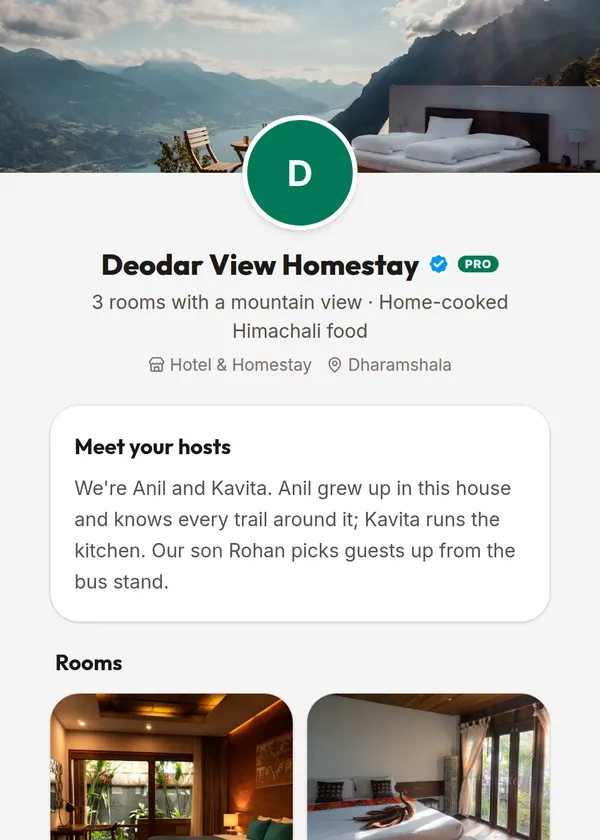
Meet your hosts
A few lines about your family and your home. It's the reason guests pick a homestay over a hotel.
Rooms and rates
Each room with photos, beds, view and rate per night. Mark it “Booked” for busy dates.
Booking form with dates
Check-in, check-out, guests and rooms, sent to your WhatsApp and saved in your Leads.
Meals, nearby and how to reach
What you cook, treks and sights near you, and the bus, train or airport route to your door.
Airbnb and Booking.com links
Buttons to your listings, so guests can read your reviews, then message you directly.
What homestay guests look for
Guests compare homestays on the hosts, the view and the food more than on price. Put these on your page.
The hosts. Who you are, what you do, and what a day at your home is like.
Rooms and view. Real photos of each room and the view from it.
Food. What you cook, whether it's veg, and meal prices.
Things to do. Treks, waterfalls, temples, cafes and markets, with distances.
How to reach. Routes, the last stretch, and parking or pickup.
House rules. Check-in times, quiet hours, pets, smoking and long stays.
Many states, including Kerala, Himachal Pradesh, Uttarakhand and Goa, run their own homestay registration scheme, and serving meals needs FSSAI registration. Check your state's current rules.
How it works
- 1
Pick your page
Start with a page made for homestays and guest houses. Change anything you like.
- 2
Add your details
Your name, phone, photos and prices. It all works from your phone, in a few minutes.
- 3
Share your link
You get a link like sify.co.in/your-name and a QR code. Put them in your Instagram bio, WhatsApp Status and Google listing.
FAQ