A website for your hotel
Guests find you on booking apps, then call to ask for a better rate or check a detail. Your own page gives them your rooms, rates and policies, and the booking form sends their dates and guests straight to your WhatsApp, with no commission on the booking.
Free plan · No card needed · Works on any phone · by Sify
What your page can do
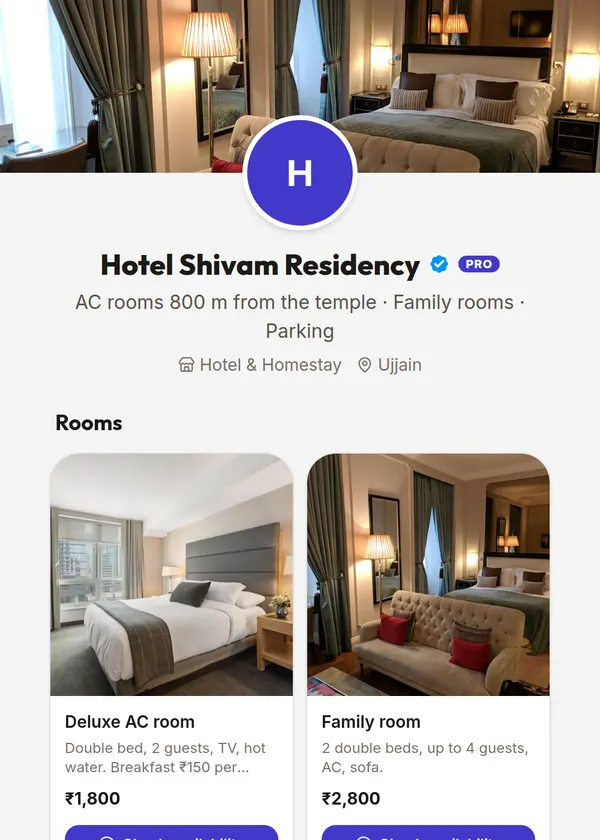
Rooms with photos and rates
Each room type with photos, who it fits and the rate per night. Mark a room “Not available” when you're full.
Booking form with dates
Guests send check-in, check-out, number of guests and rooms. You see the number of nights and confirm on WhatsApp.
Amenities and policies
Wi-Fi, parking, lift, restaurant; check-in time, ID rules, children and cancellation.
Links to your booking site listings
Buttons to your MakeMyTrip, Booking.com, Goibibo or Agoda pages, so guests can read your reviews there.
Advance by UPI (paid plan)
Take one night's advance to confirm a room, straight to your bank.
Direct bookings and booking apps
Keep your booking app listings and use your own page alongside them. Each does a different job.
Booking apps. Bring travellers who don't know you yet. You pay a commission on each booking.
Your page. For repeat guests, walk-ins, phone callers and groups. They book directly, with no commission.
Put your link everywhere. Your Google listing, visiting card, the bill, and the WhatsApp message you send after checkout.
Same rooms, same photos. Use the same room names and photos as your listings, so guests know it's the same hotel.
Link your listings. Guests who want reviews can read them on your booking app pages, then book with you directly.
Answer fast. Booking enquiries come to WhatsApp. A quick reply with the rate wins most of them.
Only hotels classified by the Ministry of Tourism may use a star rating. Hotels must report foreign guests to the police (Form C), and need FSSAI registration or a licence if they serve food. Check the current rules.
How it works
- 1
Pick your page
Start with a page made for hotels and lodges. Change anything you like.
- 2
Add your details
Your name, phone, photos and prices. It all works from your phone, in a few minutes.
- 3
Share your link
You get a link like sify.co.in/your-name and a QR code. Put them in your Instagram bio, WhatsApp Status and Google listing.
FAQ